
INFINITE SYSTEMS INSIGHTS:
Visitor Management Kiosk Philippines: QR Check-In, Host Notification and Access Control Integration
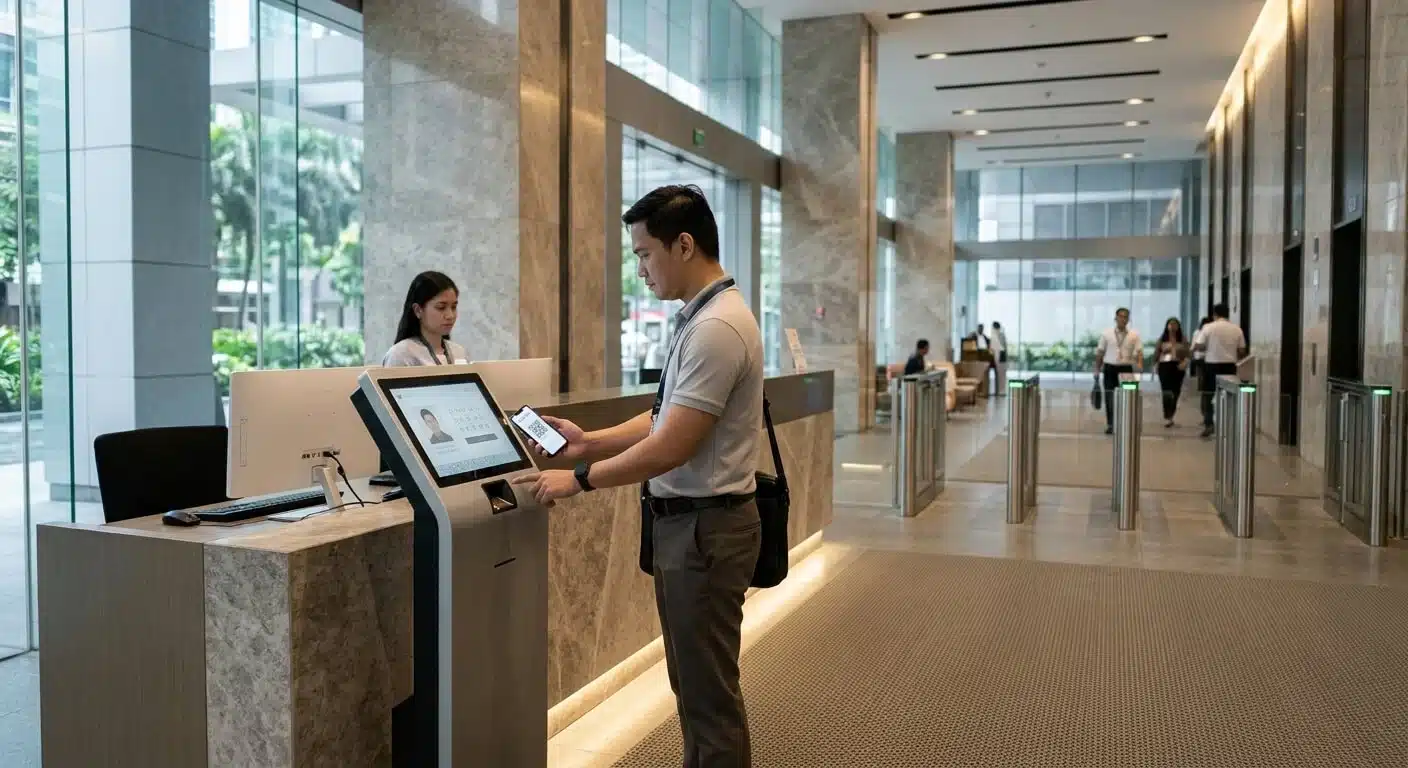
A visitor management kiosk can reduce repetitive reception work while creating a more consistent check-in experience. However, effective visitor management involves more than digital registration. The system must identify the visitor, verify the purpose of the visit, coordinate host approval, issue the appropriate temporary credential and control access to authorized areas.
For offices, commercial buildings, schools and other facilities in the Philippines, a well-planned kiosk can support faster lobby operations while maintaining security oversight. The right design depends on visitor volume, approval procedures, access-control requirements and the organization’s privacy policies.
PLANNING PRINCIPLE
Design the visitor approval process before selecting the kiosk hardware.
Registration, host confirmation, credential issuance and door permissions should work as one coordinated process. A self-service kiosk should make check-in more efficient without removing the security controls required by the facility.
01 / VISITOR CHECK-IN WORKFLOW
How a Visitor Management Kiosk Works
A typical kiosk workflow begins when a visitor arrives at the reception area. The visitor either retrieves an existing pre-registered appointment or completes a walk-in registration. The system then follows the organization’s approval rules before issuing a badge or temporary access credential.
STEP 01
Visitor Registration
Retrieve a pre-registered visit or enter the required information for a walk-in appointment.
STEP 02
Verification and Approval
Confirm the host, appointment details and any required reception or security approval.
STEP 03
Credential Issuance
Provide an approved visitor badge, QR credential or temporary access card.
STEP 04
Controlled Entry
Allow access only to the designated doors or areas within the approved time period.
02 / REGISTRATION METHODS
Pre-Registration and QR Code Check-In
Hosts or authorized employees can pre-register expected visitors before their arrival. Depending on the platform, the visitor may receive an email or message containing a QR code, appointment reference or check-in instructions.
At the lobby, the visitor presents the QR code at the kiosk. The system retrieves the associated appointment and displays the relevant check-in steps. This reduces the need to repeatedly enter information and can help reception manage scheduled arrivals more efficiently.
Walk-In Visitor Registration
For visitors without a prior appointment, the kiosk can provide a walk-in registration process. The visitor enters the required details, identifies the person or department being visited and submits the request for the applicable approval.
Keep the registration process concise. Collect only information necessary for the visit, security procedures and applicable organizational records. Additional requirements, such as identity verification or acknowledgment of visitor policies, should follow the organization’s established procedures.
Implementation note
A QR code should not automatically be treated as proof of approval. The system should validate the appointment status, credential validity and applicable access rules before allowing the visitor to proceed.
03 / HOST COMMUNICATION
Host Notification and Visitor Approval
Once a visitor completes registration, the visitor management platform can notify the designated host through supported channels such as email, SMS or integrated messaging services.
The host can then confirm the visit, depending on the system’s available approval functions and the organization’s workflow. For example, an office may require host confirmation before a visitor receives a temporary access credential, while another facility may permit immediate check-in for pre-approved appointments.
Define the approval process for situations such as:
- The host does not respond to the notification.
- The visitor arrives earlier or later than the scheduled appointment.
- The visitor cannot be matched with an existing appointment.
- The host is unavailable or the visit needs to be reassigned.
- The visitor requires access to an area beyond the original approval.
These exception procedures help prevent the kiosk from becoming a point of delay or an uncontrolled entry route.
04 / TEMPORARY ACCESS
Visitor Badges, QR Credentials and Temporary Cards
After the required approval, the system may issue a visitor credential based on the facility’s access-control design. The credential should be appropriate for the visitor’s destination, permitted activities and expected visit duration.
Printed Visitor Badge
Displays visitor identification details and other approved information for visual identification by reception or security personnel.
QR Credential
Can support check-in and controlled entry through compatible QR readers or integrated access-control equipment.
Temporary Access Card
Can provide time-limited access through compatible card readers and access-control systems.
Temporary permissions should be restricted to the approved doors, floors or zones and should expire according to the configured visit schedule or security policy. The process should also include credential return, deactivation or expiry handling when the visitor leaves.
05 / RECEPTION AND SECURITY OPERATIONS
Self-Service Does Not Mean Unattended Security
A visitor kiosk can reduce repetitive reception tasks, but it should not eliminate the role of reception personnel or security officers. Staff should retain the ability to review visitor status, assist with registration problems and respond to requests requiring manual verification.
Consider providing authorized personnel with an administrative interface that supports:
- Viewing expected, checked-in and checked-out visitors.
- Reviewing pending approvals and unresolved registrations.
- Assisting visitors who cannot complete self-service check-in.
- Handling denied, cancelled or expired appointments.
- Reviewing visitor activity records according to assigned permissions.
The kiosk should have a clear fallback procedure for network interruptions, hardware issues, failed notifications and other service disruptions. Reception and security staff should know how to continue visitor processing while maintaining the facility’s approval requirements.
06 / SYSTEM INTEGRATION
Integrating Visitor Management with Access Control
For facilities that require controlled entry, visitor management can be integrated with compatible access-control systems. This allows approved visitor credentials to operate designated doors, turnstiles or other controlled entry points, subject to the capabilities of the selected platform and hardware.
Integration planning should establish how visitor records, approval status, credentials and access permissions are exchanged between systems. It should also define what happens when a visit is cancelled, a credential expires or an access request is denied.
Visitor Management Platform
Handles registration, appointment records, host notifications and visitor status.
Access Control System
Enforces approved credentials, door permissions, schedules and access restrictions.
Turnstiles and Door Hardware
Provide the physical entry points controlled by the access-control system.
For example, an approved visitor may receive a temporary credential that works only at the lobby turnstile and the designated meeting-room floor. The same credential should not automatically grant access to offices, restricted rooms or other areas outside the approved visit.
Compatibility consideration
Confirm available APIs, software interfaces, reader compatibility, credential formats and licensing requirements before assuming that a visitor management platform can communicate directly with an existing access-control system.
07 / DATA PRIVACY AND INFORMATION SECURITY
Protecting Visitor Information
Visitor management systems may process personal information such as names, contact details, company affiliations, appointment records and visit history. The organization should define how this information is collected, accessed, stored, retained and disposed of.
For kiosk deployments in the Philippines, privacy controls should be reviewed in line with applicable data protection requirements, including the Data Privacy Act of 2012 and the organization’s privacy policies.
Practical safeguards include:
- Positioning the kiosk to reduce shoulder-surfing and casual viewing of entered information.
- Preventing subsequent users from viewing previous visitors’ records or registration details.
- Limiting administrative access according to staff roles and responsibilities.
- Using appropriate authentication and security controls for administrative accounts.
- Defining retention periods and secure disposal procedures for visitor records.
- Providing clear privacy notices and collecting only information necessary for the stated purpose.
Privacy and security requirements should be considered during system configuration and kiosk placement, rather than added only after deployment.
08 / IMPLEMENTATION CHECKLIST
Visitor Management Kiosk Planning Checklist
Before deployment, review the following requirements with the facility’s reception, security, IT and administration teams.
01 / Arrival and Registration
- Pre-registration and QR check-in
- Walk-in registration fields
- Visitor identification procedure
- Appointment lookup and validation
02 / Approval and Notification
- Host notification channels
- Approval and rejection workflow
- Pending approval handling
- Reception and security escalation
03 / Credentials and Entry
- Badge, QR or card issuance
- Door and floor permissions
- Credential validity and expiry
- Visitor check-out and deactivation
04 / Technical and Privacy
- Network and power requirements
- Platform and hardware compatibility
- Administrative access controls
- Data retention and privacy procedures
Testing Before Turnover
Test the complete visitor journey before the system is placed into regular operation. Include successful pre-registered check-ins, walk-in requests, host approvals, denied visits, expired credentials, access restrictions and visitor check-out. Also test the fallback procedure for network or notification failures.
Acceptance should confirm that the kiosk, visitor management platform, notification services and connected access-control equipment operate according to the agreed workflow.
09 / RELATED SOLUTIONS
Related Infinite Systems Solutions
A visitor management kiosk can form part of a broader building security and access-control environment. Explore related solutions that can support a coordinated visitor entry process.
Visitor Management System
Digital visitor registration, appointment handling and visitor records for organized reception operations.
Access Control Systems
Manage credentials, access permissions and controlled entry to designated areas.
10 / FREQUENTLY ASKED QUESTIONS
Visitor Management Kiosk FAQs
Can visitors check in using a QR code?
Yes. When supported by the visitor management platform, a visitor can present a QR code to retrieve a pre-registered appointment or complete a configured check-in process. The system should still validate the appointment and applicable approval requirements.
Can a visitor management kiosk notify the visitor’s host?
Yes. Supported systems can send notifications through configured channels such as email, SMS or integrated messaging services. Available options depend on the platform and its integrations.
Can the kiosk issue visitor access credentials?
It can support temporary QR credentials, printed badges or access cards, depending on the selected hardware, software and access-control integration.
Do walk-in visitors still need reception approval?
That depends on the organization’s visitor policy. Many facilities require reception or security approval for unplanned visits before issuing a visitor credential.
Can visitor access be limited to certain doors or floors?
Yes. When integrated with a compatible access-control system, temporary credentials can be assigned permissions for approved doors, floors or zones and restricted by schedule or validity period.
Should visitor information remain visible on the kiosk after check-in?
No. The kiosk interface should clear or conceal personal information after each transaction. Its physical position and software controls should also prevent subsequent users from viewing previous visitor records.
Can a visitor management kiosk operate without reception personnel?
Some workflows support self-service registration, but facilities should retain a defined process for exceptions, identity verification, approval issues and security concerns. The appropriate level of supervision depends on the site’s risk and operating requirements.
MODERNIZE VISITOR CHECK-IN