
INFINITE SYSTEMS INSIGHTS
CCTV Camera Placement in the Philippines: A Practical Guide for Commercial Buildings
Plan CCTV camera placement in Philippine commercial buildings for entrances, lobbies, corridors, parking, cash points and critical areas without creating avoidable blind spots.
PLANNING PRINCIPLE
Start with the security event—not the camera count.
A useful CCTV design begins with what the owner needs to observe, verify or investigate. Camera quantity, lens selection, mounting position and recording requirements should follow the security objective and verified site conditions.
01 / DEFINE
Security Objective
Determine whether each camera needs to provide overview, detection, verification or identification.
02 / DESIGN
Camera Placement
Match camera position, height, lens and field of view to the actual scene and movement path.
03 / VALIDATE
Lighting & Coverage
Check glare, backlight, night conditions, obstructions and critical viewing angles before final acceptance.
04 / COMMISSION
Recorded Evidence
Confirm recording, timestamps, representative views, privacy controls and final camera documentation.
01 / PROJECT CONTEXT
Start With the Security Event, Not the Camera Count
Camera placement should begin with the event the owner needs to detect, verify or investigate. A camera intended to show that someone entered a lobby has a different field-of-view requirement from a camera intended to identify a face, read a vehicle plate or document a cash-handling transaction.
For commercial buildings, the design should therefore consider the movement of people and vehicles, critical assets, controlled entrances, transaction points, restricted areas and locations where an incident may need to be reviewed later.
ENGINEERING NOTE
A camera count alone does not demonstrate adequate coverage. The final design should show what each camera is intended to see and how that view supports the site’s operational requirement.
02 / COVERAGE PLANNING
Turn Building Areas Into Camera Requirements
A practical CCTV assessment starts by dividing the building into functional areas. Each area should be reviewed according to the type of activity taking place and the evidence required from the camera system.
Entrances & Exits
Approach paths, thresholds, doors and visitor movement.
Lobbies & Reception
Visitor flow, reception interactions and controlled entrances.
Corridors & Doors
Movement paths, restricted areas and critical door events.
Parking & Vehicle Areas
Vehicle lanes, barriers, pedestrian crossings and parking activity.
Cash & Transaction Points
Areas where identification or transaction-related evidence may be required.
Critical & Restricted Areas
Locations requiring controlled observation or incident investigation.
The resulting camera schedule should identify the location, purpose, camera type, lens or viewing requirement, mounting position and any special conditions that need to be addressed during installation.
03 / ENTRANCES & EXITS
Design Entrance Coverage Around the Actual Entry Event
Cover both the approach and the actual threshold where practical. Avoid relying on a very wide lobby view when facial detail or a closer view of the entry event is required.
Glass entrances can introduce strong backlight during daylight hours. Camera selection, aiming and commissioning should account for changing exterior light so that the important area remains usable rather than becoming a dark foreground against a bright background.
DESIGN CHECK
- Can the approach to the entrance be observed?
- Is the actual entry event visible?
- Does glass or exterior lighting create backlight?
- Will doors or visitor queues obstruct the intended view?
04 / LOBBIES & CONTROLLED ENTRANCES
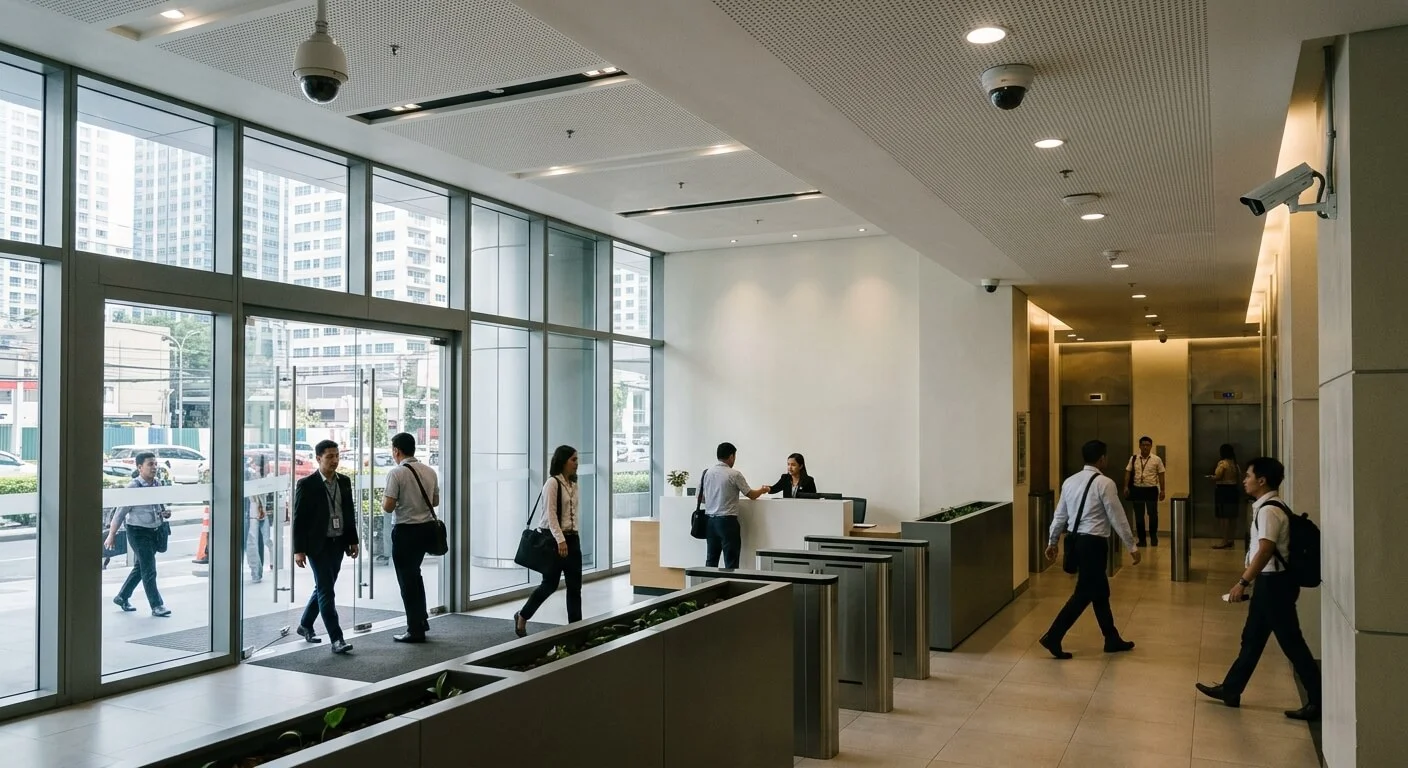
Lobbies, Reception and Turnstile Areas
Use views that show the visitor path, reception interaction and controlled entrance without being blocked by decorative features, columns, signage or crowds.
For turnstile areas, position cameras to show the lane and user movement while avoiding unnecessary capture of sensitive screen information. Where access control and CCTV are integrated, the camera view should support investigation of the relevant access event rather than simply provide a general view of the lobby.
Visitor Flow
Follow the actual path from approach to reception and controlled entry.
Controlled Entry
Show the relevant turnstile, door or access event without unnecessary views.
Obstruction Check
Review columns, signage, furniture and crowding before finalizing the mounting point.
05 / CORRIDORS & RESTRICTED AREAS
Corridors, Doors and Critical Areas
Corridors often provide general situational coverage, while critical doors may require more useful identification detail. At important entrances to restricted areas, consider whether a general overview is sufficient or whether a dedicated view is justified.
The final position should be checked against the installed environment. Door leaves, columns, beams, signs, suspended ceilings and other building elements can change the usable view after installation.
IMPORTANT
Do not finalize a camera location from a floor plan alone. The actual mounting height, surrounding structure, viewing angle and installed obstructions should be validated on site.
06 / PARKING & VEHICLE AREAS
Parking CCTV and Vehicle Entry Coverage
Vehicle lanes need different views from general parking surveillance. Entry and exit overview, barrier operation, pedestrian crossings and plate-capture requirements should be treated as separate design considerations where applicable.
General parking cameras are intended to provide situational coverage across the area. License plate recognition (LPR), where required, needs a controlled plate view and suitable capture conditions. A general wide-angle parking camera should not automatically be treated as an LPR camera.
Parking Overview
Provides broader situational awareness across vehicle and pedestrian areas.
Entry / Exit
Focuses on vehicle movement, barriers and the actual entry or exit event.
Plate Capture
Requires an appropriate view and capture conditions when LPR is part of the requirement.
07 / CAMERA POSITION & IMAGE DETAIL
Height, Lens and Field of View
Mounting height affects the viewing angle and the amount of useful facial or subject detail available to the camera. A higher camera is not automatically better if the resulting angle reduces the detail needed at the critical event.
Lens selection should follow scene width, distance and the required image detail rather than using the same lens everywhere. A wider lens may provide broader situational coverage, while a tighter view may be more appropriate where the objective is to observe a specific doorway, transaction point or vehicle lane.
ENGINEERING NOTE
More megapixels do not automatically guarantee useful evidence. Subject size, distance, lighting, field of view, angle and camera positioning all affect the practical quality of the recorded image.
08 / LIGHTING & NIGHT CONDITIONS
Commission Cameras Under Realistic Lighting Conditions
A camera view that looks acceptable during daytime may behave differently at night. Exterior lighting, vehicle headlights, reflective surfaces, glass, dark corners and infrared illumination can change the usable image.
Commissioning should therefore include representative day and night conditions where the camera is expected to operate during both periods. Critical views should be checked after installation rather than relying only on a specification sheet or daytime preview.
Daylight
Check glare, backlight and changing exterior light.
Night
Check dark areas, IR performance and available lighting.
Headlights
Check vehicle headlight bloom and changing exposure conditions.
Reference View
Save representative images for the final project record.
09 / PRIVACY & OPERATIONAL USE
Privacy, Retention and Operational Use
CCTV coverage should be connected to a defined security purpose. Avoid placing cameras where surveillance is not justified by the operational requirement, and consider whether the selected view captures areas outside the intended security scope.
Coordinate viewing permissions, recording retention, video exports and investigation procedures with the organization’s applicable privacy and security policies. Where privacy masking or restricted access is required, these requirements should be incorporated into the design and commissioning process.
PROJECT CONTROL
Document who can view live video, review recorded footage, export evidence and administer the CCTV platform. These operational requirements should be considered alongside the physical camera design.
10 / COMMISSIONING
CCTV Commissioning and Final Coverage Check
The final camera position should be validated against the approved security objective. Walk the actual user and vehicle routes, review live and recorded views, and confirm that the installed environment has not introduced avoidable blind spots.
01 — Verify Events
Confirm each required security event is visible.
02 — Check Detail
Check identification detail at critical points.
03 — Test Lighting
Review representative day and night scenes.
04 — Inspect Obstructions
Confirm doors, columns, signs and other elements do not block the required view.
05 — Verify Recording
Check recording, playback and timestamps.
06 — Document Final Views
Record camera names, locations and representative reference images.
11 / PROJECT CHECKLIST
CCTV Camera Placement Checklist
- Define the security objective for each required camera view.
- Identify entrances, exits, lobbies, reception and controlled access points.
- Review corridors, restricted areas, cash points and other critical locations.
- Separate general parking coverage from vehicle entry and LPR requirements where applicable.
- Confirm mounting height, viewing angle and lens requirements.
- Check glass, daylight, artificial lighting, headlights and night conditions.
- Review columns, doors, signage, furniture and other potential obstructions.
- Confirm recording and timestamp requirements.
- Coordinate viewing permissions, retention and video export procedures.
- Verify privacy masks or other applicable privacy controls.
- Walk actual user and vehicle routes during commissioning.
- Save final camera names, locations and representative reference images.
12 / RELATED SOLUTIONS
Related Infinite Systems Solutions
CCTV & Video Surveillance
Structured Cabling Systems
Preventive Maintenance Services
13 / FREQUENTLY ASKED QUESTIONS
Frequently Asked Questions
How high should CCTV cameras be mounted?
There is no universal height. Mounting should balance protection from tampering with the viewing angle and identification detail required for the scene.
Should one camera cover an entire lobby?
A wide overview can be useful, but critical identification points may require additional views depending on the security objective, scene geometry and required image detail.
Where should cameras be placed at entrances?
Cover both the approach and the actual entry event where practical while accounting for backlight, door movement, visitor flow and the required image detail.
Is parking CCTV the same as LPR?
No. General parking cameras provide situational coverage, while LPR requires a controlled plate view and suitable capture conditions.
How do I find CCTV blind spots?
Walk the actual user and vehicle routes during commissioning and compare them against live and recorded views. Also check for obstructions created by the installed building elements.
Should camera placement consider privacy?
Yes. Coverage should be justified by a security purpose and managed under the organization’s applicable privacy and security policies.
PLAN YOUR PROJECT
Need a Site-Specific CCTV Assessment?
Infinite Systems can assess the actual site, identify critical views and prepare a practical CCTV design and implementation scope based on the building layout, security objectives and operating requirements.