
INFINITE SYSTEMS INSIGHTS:
School Gate Security: How to Design a Safer and More Controlled Entrance
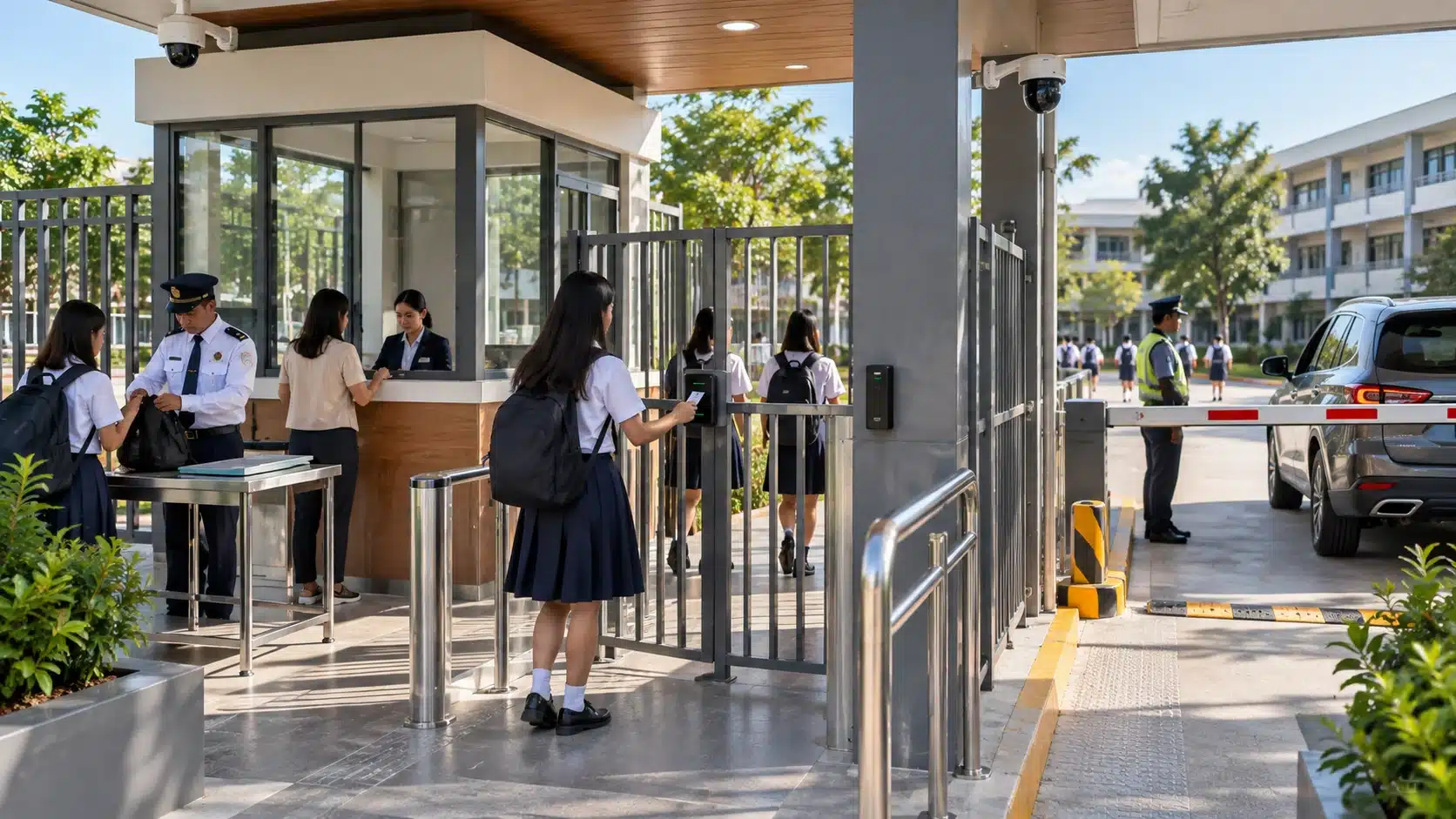
A secure school gate should do more than control who enters and exits. It should direct pedestrian and vehicle movement, support screening, give security personnel clear visibility, reduce bypass routes, and keep arrival and dismissal traffic manageable.
For Philippine schools, entrance security works best when physical security, trained personnel, surveillance, visitor control, screening and access control are planned as one coordinated workflow rather than as separate equipment purchases.
Plan the gate around actual pedestrian and vehicle movement, peak traffic, screening procedures, emergency egress and the school’s operational requirements.
Direct people and vehicles through defined entry points.
Maintain visibility over gates, queues, approaches and interactions.
Support bag inspection and electronic screening where required.
Give guards defined procedures for visitors, alarms and exceptions.
ENTRANCE SECURITY
What Should a Secure School Gate Accomplish?
The entrance is where the school’s security procedures become a physical workflow. A well-planned gate should make the intended route obvious to students, employees, parents, visitors, delivery personnel and vehicles.
Direct pedestrians and vehicles through clearly identified and controlled entry points.
Give security personnel clear views of approaching people, queues, vehicles and interaction points.
Provide an appropriate location for bag inspection or electronic screening without obstructing emergency routes.
Use CCTV, visitor records and access-control events where appropriate to support incident review.
PEOPLE FLOW
Design the Entrance Around Peak People Flow
The first planning question should not be which security device to purchase. It should be how students, staff, parents, visitors and vehicles move through the entrance during the busiest periods of the school day.
Arrival and dismissal can create very different traffic patterns from normal operating hours. The entrance should therefore be assessed according to peak conditions rather than average traffic.
Provide a defined route for students and staff that does not conflict unnecessarily with vehicle movement.
Separate drop-off and vehicle access from pedestrian screening where the site allows.
Provide a controlled point where visitors can be identified and directed to the appropriate process.
Allow screening activities to take place without blocking the main entrance or creating uncontrolled queues.
Queue space should remain within a controlled approach area where possible. Covered screening and guard positions should also be considered because Philippine schools may need to operate entrances under rain, heat and other weather conditions.
CCTV SURVEILLANCE
Use CCTV to Maintain Gate Visibility
CCTV should support both live security awareness and incident review. Camera locations should be planned around the actual entrance workflow rather than simply installing cameras above the gate.
Monitor people and vehicles approaching the controlled entrance.
Provide visibility over pedestrian and vehicle movement through the checkpoint.
Cover key points where guards verify visitors, inspect bags or manage access.
Consider areas where people or vehicles could bypass the primary checkpoint.
For broader surveillance planning, see the CCTV and Video Surveillance Systems solution page.
VISITOR CONTROL
Separate Visitor and Regular User Workflows
Students and employees typically follow established entrance procedures, while visitors, contractors and delivery personnel may require identification, authorization and additional verification.
A visitor management workflow can record information such as the visitor’s host, purpose, time of entry, destination and temporary authorization. Where supported, approved visitors may receive time-limited credentials for selected controlled areas.
Confirm visitor identity and reason for entering the campus.
Confirm the appropriate host, destination and permission.
Maintain the applicable visitor record and entry information.
Limit access to the areas and time period authorized.
See Visitor Management Systems for related visitor-control workflows.
SCREENING & PHYSICAL SECURITY
Coordinate Barriers, Gates and Screening
Physical barriers should support the intended security route by closing obvious gaps between the gate, fence line, pedestrian lane and vehicle lane. Screening should also have a defined location and procedure.
Use gates, barriers or controlled lanes to direct pedestrians through the intended checkpoint.
Use appropriate gates or barriers to manage authorized vehicle movement and reduce drive-around routes.
Provide a defined inspection point with enough space to keep the screening activity clear of the main queue.
Where used, electronic screening equipment should support trained personnel and documented procedures.
Security equipment does not replace trained personnel or established procedures. The school should define what happens when a screening alert, unauthorized entry attempt, visitor exception or other security event occurs.
ACCESS CONTROL
Extend Gate Security Into the Campus
Gate security should not end after a person passes through the entrance. Access control can continue the security workflow by restricting selected doors, offices, laboratories, administrative areas and other staff-only or controlled zones.
Where pedestrian traffic volume or campus layout justifies it, access control can also be coordinated with turnstiles or controlled pedestrian gates.
Controls the initial campus entry point.
Identifies authorized users where credential-based access is required.
Restricts access to selected internal spaces according to permissions.
Learn more about Access Control Systems.
PEAK TRAFFIC
Plan for Arrival and Dismissal Congestion
A gate that operates smoothly at 10:00 AM may become difficult to manage when hundreds of students arrive within a short period. Entrance planning should therefore consider the busiest periods of the school calendar.
Estimate the number of pedestrians and vehicles arriving during the busiest periods.
Keep pedestrians, vehicles, visitors and deliveries separated where the site permits.
Consistent workflows help guards manage high-volume periods without unnecessary steps.
Avoid allowing queues to obstruct vehicle lanes, public roads or emergency routes.
SITE INFRASTRUCTURE
Do Not Overlook Power, Network and Weather Protection
Entrance security equipment depends on supporting infrastructure. Power availability, network connectivity, cable routes, equipment mounting and environmental protection should be considered during design rather than after equipment has been selected.
Confirm power availability and backup requirements for critical equipment.
Plan network connectivity for CCTV, access control and visitor-management systems where required.
Consider cable pathways, conduits, distance and access for future maintenance.
Provide suitable protection for guards and equipment exposed to rain, heat and outdoor conditions.
IMPLEMENTATION
School Gate Security Planning Workflow
A coordinated site assessment can help identify security gaps before equipment is purchased. The following workflow provides a practical starting point.
Survey
Review gates, approaches, pedestrian routes, vehicle lanes and existing infrastructure.
Map
Identify users, visitor workflows, queues and potential bypass routes.
Design
Coordinate barriers, screening, CCTV, access control and supporting infrastructure.
Implement
Install and configure the selected equipment and security workflows.
Test
Verify normal operation, visitor handling, alarms and applicable emergency procedures.
Maintain
Keep equipment, software, documentation and security procedures under regular review.
PLANNING CHECKLIST
School Gate Security Checklist
- Map every pedestrian and vehicle approach.
- Identify potential walk-around and drive-around bypass routes.
- Measure peak arrival and dismissal traffic.
- Define visitor, delivery and contractor procedures.
- Confirm CCTV coverage and lighting conditions.
- Provide weather protection for guards and screening equipment.
- Coordinate emergency egress and applicable fire-safety requirements.
- Plan power, network, cabling and maintenance access.
FREQUENTLY ASKED QUESTIONS
School Gate Security FAQs
Should every school use turnstiles at the main gate?
No single entrance configuration is suitable for every school. The decision depends on student volume, accessibility, emergency egress, age groups, operating procedures and the physical layout of the campus.
Where should school gate CCTV cameras be installed?
Typical coverage includes the public approach, pedestrian lanes, vehicle lanes, guard interaction points, queue areas, barriers and side approaches that could create a bypass route. Final camera locations should be based on the actual site and required viewing objectives.
Can visitor management work with access control?
Yes, where the selected platforms support the required integration. Visitor workflows can potentially be coordinated with temporary credentials or permissions for approved doors, turnstiles or other controlled areas.
How can schools reduce entrance congestion?
Separate user groups where practical, provide adequate queue space, keep screening procedures consistent and size lanes according to peak traffic rather than average traffic.
Can security equipment eliminate the need for guards?
Security equipment supports the entrance-security process but does not automatically replace trained personnel. Guards remain important for observation, verification, screening procedures, visitor handling and response to exceptions.
RELATED SOLUTIONS
Related School Security Solutions
A school entrance can be designed as part of a broader security environment, with individual systems supporting different stages of the security workflow.
Monitor gate approaches, entry lanes, queues and other critical areas.
Manage controlled access to selected campus buildings and internal areas.
Support visitor identification, authorization and temporary access workflows.
SCHOOL SECURITY PLANNING
Planning a School Gate Security Upgrade?
Infinite Systems can assess your gate layout, pedestrian and vehicle flow, CCTV coverage, visitor process, access control and screening requirements as one coordinated entrance-security design.