
INFINITE SYSTEMS INSIGHTS:
Baggage Scanners for School Entrance Security in the Philippines
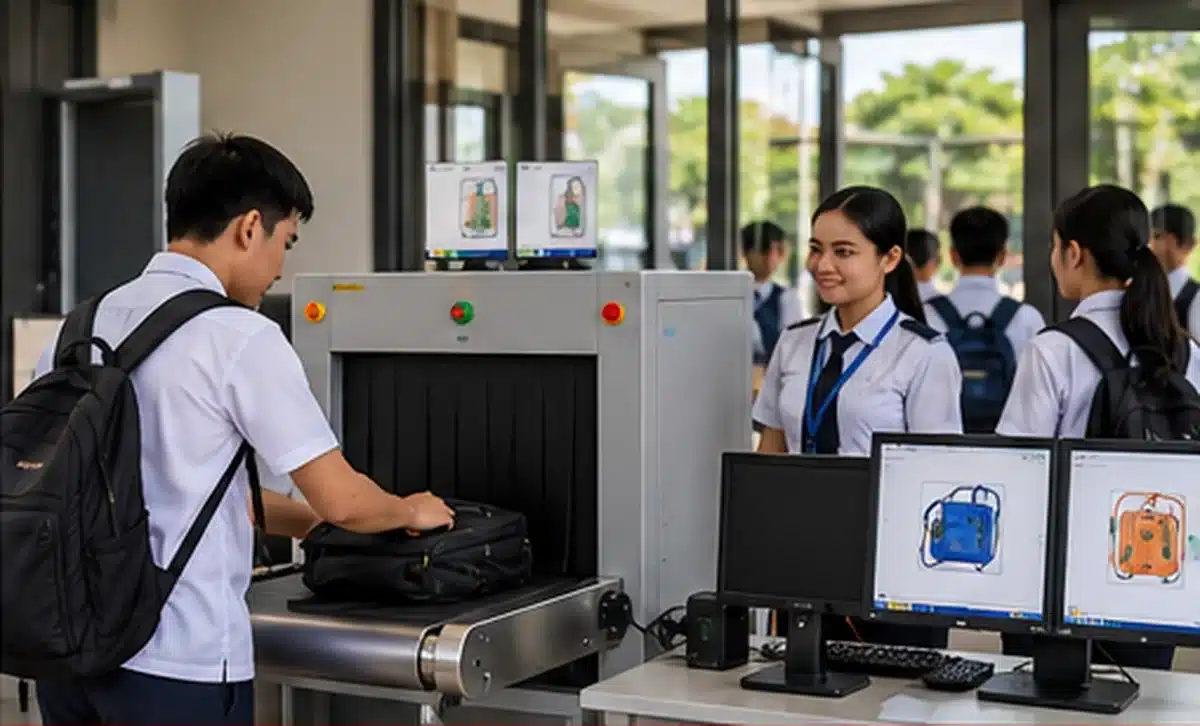
Baggage scanners can support non-contact inspection of backpacks, packages, and other carried items at controlled school entrances. However, the scanner is only one part of the checkpoint. Effective deployment also depends on entrance layout, trained operators, queue management, secondary-inspection procedures, and coordination with other security systems.
For schools evaluating baggage-scanning equipment, the site should be planned around the actual movement of students, employees, and visitors. Student volume, bag sizes, conveyor loading space, operator visibility, pedestrian flow, and the location of any secondary-inspection area can all affect how well the checkpoint performs.
SOLUTION PAGE
For broader entrance-security planning, explore
Access Control Systems
and related school security solutions.
Non-contact examination of bags and carried items at a controlled checkpoint.
Trained operators review scanner images and identify items requiring further attention.
Conveyors, lanes, and queue barriers help maintain an organized screening process.
CCTV can provide visual coverage of the checkpoint and support incident review.
BAGGAGE SCREENING EQUIPMENT
What a School Baggage Scanner Does
A baggage scanner is designed to inspect carried items without requiring routine manual opening of every bag. The scanner produces an image that is reviewed by a trained operator according to the school’s approved screening procedure.
Bag Inspection
Screens backpacks, packages, and other carried items through the scanner without requiring routine manual handling.
Operator Review
A trained operator reviews the scanner image and identifies items that require clarification or further inspection.
Controlled Flow
The conveyor establishes a defined process for loading, scanning, and collecting bags at the checkpoint.
Checkpoint Visibility
CCTV can monitor the surrounding checkpoint and provide additional visual context for security personnel.
APPLICATIONS
Where Baggage Scanners Fit in School Security
The appropriate location for a baggage scanner depends on the school’s entrance configuration, expected traffic, security requirements, and available space. Possible applications include routine screening points and selected higher-control entrances.
Main Campus Entrance
Can support bag screening where student traffic is directed through a defined and controlled entrance.
Visitor & Delivery Entrance
Can be used at designated entrances for visitors, deliveries, and other controlled access requirements.
Large School Events
Additional screening arrangements may be established for selected school activities with higher visitor or participant volumes.
Administrative Buildings
Controlled building entrances may require additional screening based on the school’s security plan.
Temporary Screening Points
Portable or temporary arrangements may be considered for selected activities when appropriate to the site and procedure.
SCREENING WORKFLOW
Typical School Baggage Screening Workflow
The scanner should be incorporated into a controlled process that defines where bags are loaded, how images are reviewed, how pedestrians continue through the entrance, and what happens when an item requires further clarification.
LOAD THE BAG
The entrant places the bag on the designated input conveyor according to checkpoint instructions.
SCAN THE BAG
The bag passes through the scanner while the trained operator reviews the resulting image.
MAINTAIN FLOW
The entrant continues through the designated pedestrian route without creating an uncontrolled bypass around the screening point.
SECONDARY INSPECTION
If an item requires clarification, the bag is directed to the approved secondary-inspection area according to procedure.
CLEAR OR ESCALATE
The entrant is cleared or the matter is handled according to the school’s approved security and escalation process.
DEPED 2026 SECURITY CONTEXT
Baggage Scanning and School Entrance Procedures
DepEd Order No. 006, s. 2026 identifies bag scanners as an authorized non-contact method for routine entry inspection. The guidance also emphasizes structured procedures for bag inspection and escalation.
Schools should therefore consider the baggage scanner as part of a complete checkpoint procedure. Equipment selection, operator training, queue control, secondary inspection, CCTV coverage, power supply, maintenance, and response procedures should be reviewed together.
Equipment
Select a scanner with dimensions and operating characteristics appropriate for the bags and traffic expected at the checkpoint.
Operators
Assign trained personnel who understand normal operation, image review, and the school’s approved response procedure.
Procedure
Define how bags are screened, how concerns are handled, and where secondary inspection takes place.
Site Design
Provide adequate space for the scanner, queue, operator position, pedestrian circulation, and secondary inspection.
TECHNICAL CONSIDERATIONS
Key Baggage Scanner Specifications to Review
Not every baggage scanner is appropriate for every school entrance. Procurement should look beyond the scanner itself and consider how the equipment will operate in the actual environment.
Tunnel & Conveyor Dimensions
Review the tunnel opening, conveyor dimensions, loading height, and whether typical school bags can pass through the equipment comfortably.
Image & Operator Controls
Consider image quality, display arrangement, operator controls, image-enhancement functions, and other features supported by the selected model.
Power & Electrical Supply
Confirm electrical requirements and consider appropriate UPS or backup-power provision where continuous operation is important.
Installation Environment
Plan for a suitable covered area with adequate ventilation, clearance, and protection from conditions that could affect equipment operation.
Operator Position
The operator should have a practical position for monitoring the scanner display while maintaining visibility of the checkpoint.
Service & Maintenance
Review warranty, preventive maintenance, calibration requirements, technical support, spare parts, and expected service response.
PEAK TRAFFIC PLANNING
Designing a Baggage Screening Checkpoint for Student Traffic
School arrival periods can create concentrated pedestrian and baggage traffic. If the scanner becomes a bottleneck, queues can extend into walkways or interfere with other entrance functions. The screening checkpoint should therefore be evaluated based on peak rather than average traffic.
Student Volume
Estimate the number of students expected to pass through the checkpoint during the busiest arrival period.
Bag Handling
Allow enough space for placing bags on the conveyor and collecting them after scanning without obstructing the next entrant.
Queue Management
Use an organized queue arrangement that keeps pedestrian traffic within the intended screening route.
Emergency Access
Screening infrastructure should not block required emergency routes, doors, or other essential access paths.
SYSTEM INTEGRATION
Integrating Baggage Scanners with School Security Systems
Baggage screening can be coordinated with other security technologies to create a more complete entrance-control system. The exact integration capabilities depend on the selected equipment and platform and should be confirmed during project planning.
CCTV Surveillance
Cameras can monitor the scanner, conveyor, queue, operator position, and surrounding entrance area.
Access Control
Access-control systems can manage authorized entry to restricted buildings or areas beyond the screening checkpoint.
Metal Detection
Person-screening metal detectors can complement baggage inspection where both carried-item and person screening are required.
Visitor Management
Visitor registration and identification procedures can be combined with controlled screening at designated visitor entrances.
Systems installed at the same checkpoint should not automatically be assumed to be integrated. Interface requirements, network infrastructure, software compatibility, available outputs, and the capabilities of each selected system should be reviewed before implementation.
PROCUREMENT CHECKLIST
Baggage Scanner Procurement Checklist for Schools
A clear procurement scope makes it easier to compare equipment based on the school’s actual application, installation environment, and long-term operating requirements.
Scanner
- Tunnel opening suitable for school bags
- Conveyor dimensions and height
- Image quality and operator controls
- Supported image-enhancement features
Installation
- Available floor space
- Power requirements
- UPS or backup-power provision
- Ventilation and covered installation area
Checkpoint
- Operator position
- Queue barriers
- Bag loading and collection space
- Secondary-inspection area
Support
- Operator orientation
- Warranty coverage
- Preventive maintenance
- Calibration and technical service
IMPLEMENTATION APPROACH
A Practical Approach to School Baggage Screening
A successful installation starts with the checkpoint rather than the equipment alone. Schools can review the project in stages to ensure the scanner, entrance layout, operating procedure, and supporting security systems work together.
ASSESS
Review entrance layout, traffic, bag volume, and security requirements.
DESIGN
Plan scanner placement, pedestrian flow, queues, and secondary inspection.
SPECIFY
Define scanner, power, installation, service, and integration requirements.
INSTALL
Install and configure the equipment according to the approved site plan.
TRAIN
Orient operators on equipment use, image review, and approved procedures.
REVIEW
Evaluate actual traffic flow and adjust the checkpoint process where appropriate.
FREQUENTLY ASKED QUESTIONS
School Baggage Scanner FAQs
Is a baggage scanner the same as a metal detector?
No. A baggage scanner examines carried items, while a metal detector is intended to screen a person for metal objects. They can be used as complementary technologies within an appropriately designed checkpoint.
Can students keep their bags closed during scanning?
Yes. The scanner is intended to inspect the contents of a bag without routinely opening it. If an item requires clarification, the bag can be handled according to the school’s approved secondary-inspection procedure.
Does a baggage scanner require a trained operator?
Yes. Proper operation and image interpretation require trained personnel who understand the equipment and the school’s approved screening and escalation procedures.
Can a school use a baggage scanner and metal detector together?
Yes. The two systems address different screening objectives and can be arranged within a controlled entrance checkpoint when appropriate to the school’s security plan.
Does a baggage scanner need CCTV?
Not necessarily. A scanner can operate independently, but CCTV can provide additional visibility around the checkpoint and support incident review.
What should schools consider before purchasing a baggage scanner?
Schools should review tunnel size, conveyor dimensions, traffic volume, power requirements, installation space, operator position, queue control, secondary inspection, training, warranty, maintenance, and possible integration with other security systems.
RELATED SCHOOL SECURITY SOLUTIONS
Build a More Complete School Entrance Security System
Access Control Systems
Manage authorized access to selected school buildings and restricted areas.
Turnstile Systems
Support controlled pedestrian entry where a defined access lane is appropriate.
CCTV Surveillance
Provide visibility around screening checkpoints and other important areas of the campus.
SCHOOL SECURITY PLANNING
Planning a School Baggage-Scanning Checkpoint?
Infinite Systems can help schools plan baggage scanner placement, pedestrian flow, CCTV coverage, queue control, secondary screening areas, access control, and other supporting security infrastructure based on the site’s requirements.
“`