
INFINITE SYSTEMS INSIGHTS:
Metal Detectors for School Entrance Security in the Philippines
School entrance security requires more than a single piece of equipment. Metal detectors can support a structured screening process by providing non-contact detection at designated entry points, but their effectiveness depends on proper placement, trained personnel, queue management, alarm procedures, and coordination with other security measures.
For schools evaluating metal detection, the first step is to define the intended use. A detector may support routine entrance screening, secondary inspection after an alert, or additional screening requirements during school events and higher-risk periods.
SOLUTION PAGE
For broader school security planning, explore
Access Control Systems
and related entrance-security solutions.
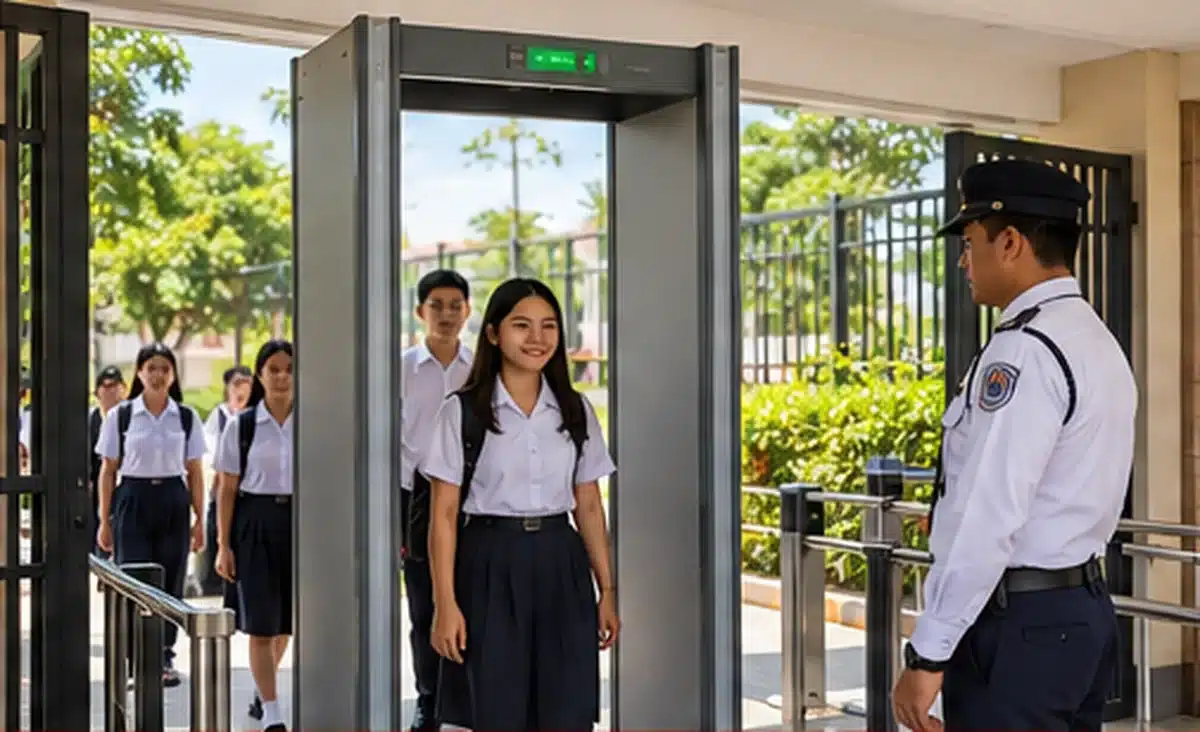
Non-contact screening at designated school entry points.
Structured lanes and queue management help maintain orderly entry flow.
Trained personnel follow the approved process when an alarm occurs.
CCTV and other systems can support checkpoint visibility and incident review.
METAL DETECTION EQUIPMENT
Walk-Through vs. Handheld Metal Detectors
Schools may use different detector types depending on the entrance layout, expected traffic, staffing, and screening procedure. Walk-through detectors are generally suited to controlled screening lanes, while handheld detectors can support secondary or targeted non-contact screening.
Walk-Through Detector
Screens people as they pass through a defined lane and can support consistent screening during regular entrance operations.
Handheld Detector
Provides a portable option for secondary or targeted non-contact screening following an alert or under an approved school procedure.
Queue-Control Equipment
Railings, barriers, and lane arrangements can help keep students and visitors within the intended screening route.
Security Personnel
Trained personnel remain responsible for managing the checkpoint, interpreting alerts, and following the approved response procedure.
Equipment specifications should be reviewed against the actual entrance environment. Opening dimensions, sensitivity requirements, available power, expected traffic, and the school’s operating procedure can all affect the appropriate detector configuration.
APPLICATIONS
Where Schools Can Deploy Metal Detection
Metal detection does not have to be limited to a single entrance. Depending on the school’s security plan and site layout, equipment can be positioned at different access points or used for specific situations.
Main Student Entrance
Supports controlled screening during arrival periods when student traffic is concentrated.
Visitor Entrance
Can form part of a visitor screening checkpoint near the guardhouse or designated visitor access point.
School Events
Additional screening arrangements can be established for large school activities or selected events.
Controlled Building Entry
Specific administrative or restricted areas may require additional screening based on the school’s security plan.
Secondary Screening Point
A separate location can be used when an initial screening alert requires further authorized non-contact inspection.
ENTRANCE SECURITY WORKFLOW
Recommended School Screening Workflow
The detector should operate as part of a defined entrance process rather than as a standalone device. A practical workflow establishes where people enter, where screening occurs, what happens after an alarm, and who is responsible for the next action.
CONTROL THE ENTRY LANE
Direct students, employees, and visitors into the intended screening route and minimize uncontrolled bypass points.
CONDUCT INITIAL SCREENING
Have the entrant pass through the walk-through detector according to the school’s established screening procedure.
MANAGE ALERTS
When an alert occurs, direct the person to the designated secondary-screening area without disrupting the main entrance flow.
SECONDARY SCREENING
Use a handheld detector or another authorized non-contact method as required by the school’s approved procedure.
DOCUMENT OR ESCALATE
Record or escalate the event according to applicable school policy and the responsibilities assigned to security personnel.
DEPED 2026 SECURITY CONTEXT
Metal Detection and School Entrance Procedures
DepEd Order No. 006, s. 2026 identifies authorized non-contact methods for routine entry inspections, including electronic scanners and handheld metal detectors. The guidance also states that physical pat-downs should not form part of the authorized routine protocol.
For schools implementing or reviewing entrance screening, equipment selection should therefore be considered together with the operating procedure. The school should establish who operates the equipment, how an alert is handled, where secondary screening takes place, and how learners and visitors are treated during the process.
Equipment
Select detector types and specifications appropriate to the entrance and intended screening process.
Personnel
Assign trained personnel to operate equipment and manage the screening checkpoint.
Procedure
Define how routine screening, alarms, secondary screening, and escalation are handled.
Site Layout
Provide enough space for controlled entry, screening, queues, and secondary procedures.
SYSTEM INTEGRATION
Integrating Metal Detection with Other School Security Systems
A metal detector can operate independently, but schools may benefit from coordinating the screening checkpoint with other security infrastructure. Integration requirements depend on the selected equipment and platform and should be confirmed during project planning.
CCTV Surveillance
Cameras can provide visual coverage of the entrance, screening lane, guard position, and surrounding area while supporting incident review.
Access Control
Access control can regulate authorized entry to restricted areas and provide another layer of control beyond the initial screening checkpoint.
Visitor Management
Visitor registration and identification processes can complement physical screening at designated visitor entrances.
Security Communications
Clear communication procedures help guards and school personnel coordinate responses when an alert or security incident occurs.
Integration should not be assumed simply because two systems are installed at the same entrance. Interface requirements, available outputs, software compatibility, network infrastructure, and the capabilities of the selected equipment should be reviewed before procurement.
HIGH-TRAFFIC ENTRANCES
Planning for Student Arrival and Peak Traffic
School entrances can experience a significant increase in pedestrian traffic during arrival and dismissal periods. A screening system that works well during normal traffic may require additional planning during peak periods.
Entrance Capacity
Review the number of people expected to pass through the screening area within the busiest periods.
Queue Length
Allow enough space for organized waiting without obstructing adjacent entrances, walkways, or emergency routes.
Staffing
Determine whether additional personnel are required to maintain screening flow and manage secondary inspections.
Contingency Planning
Consider procedures for equipment downtime, unusually high traffic, events, and other conditions that may affect normal screening.
PROCUREMENT & SITE PLANNING
What to Include in a School Metal Detector Procurement Scope
A clear procurement scope helps the school compare equipment based on the actual application rather than price alone. The following items can be reviewed during specification and project planning.
Detector Specifications
- Detector type
- Clear opening dimensions
- Sensitivity requirements
- Zone indication where applicable
Installation Requirements
- Available floor and entrance space
- Power requirements
- Backup-power strategy
- Queue-control barriers
Service & Support
- Operator orientation
- Basic user training
- Warranty coverage
- Preventive maintenance and service response
Security Integration
- CCTV requirements
- Access control requirements
- Visitor management
- Network or system-interface requirements
IMPLEMENTATION APPROACH
A Practical Approach to School Entrance Security Planning
For a new installation or security upgrade, schools can evaluate the project in stages to ensure the equipment, entrance layout, operating procedure, and supporting systems work together.
ASSESS
Review entrances, traffic, risks, and existing security.
DESIGN
Plan screening lanes, queues, secondary screening, and equipment placement.
SPECIFY
Define detector, power, installation, service, and integration requirements.
INSTALL
Position and configure equipment according to the approved site plan.
TRAIN
Orient assigned personnel on normal operation and approved procedures.
REVIEW
Evaluate actual entrance flow and adjust procedures where appropriate.
FREQUENTLY ASKED QUESTIONS
School Metal Detector FAQs
Are metal detectors mandatory for every school?
Deployment depends on applicable directives, local implementation, school risk assessment, and approved procurement or security plans. Schools should confirm the requirements applicable to their specific institution.
What is the difference between a walk-through and handheld detector?
A walk-through detector screens people through a defined entrance lane, while a handheld detector is typically used for secondary or targeted non-contact screening.
Can a metal detector replace security guards?
No. Security personnel remain important for managing queues, operating or supervising screening equipment, responding to alerts, and following the school’s approved security procedures.
Can metal detectors be used together with CCTV?
Yes. CCTV can provide visual coverage of the screening area and support incident review. The detector may operate independently, while integration requirements depend on the selected equipment and system architecture.
What should schools consider before buying a metal detector?
Schools should consider entrance traffic, available space, detector dimensions, sensitivity, power requirements, queue control, staffing, secondary-screening procedures, warranty and service support, and potential integration with CCTV or access control.
RELATED SCHOOL SECURITY SOLUTIONS
Build a More Complete School Entrance Security System
Access Control Systems
Control authorized access to selected school buildings and restricted areas.
Turnstile Systems
Support controlled pedestrian entry where a defined access lane is appropriate.
CCTV Surveillance
Provide visibility around entrance checkpoints and other important areas of the campus.
Plan with the overall security system.
SCHOOL SECURITY PLANNING
Need Metal Detection for a School Entrance?
Infinite Systems can help schools plan metal detection checkpoints together with entrance flow, CCTV surveillance, access control, turnstiles, and other supporting security infrastructure. Equipment selection and system configuration can be reviewed based on the school’s site conditions and operational requirements.
“`